Ayushman Card is an important health card issued under the Ayushman Bharat Pradhan Mantri Jan Arogya Yojana (PM-JAY). It provides cashless health coverage of up to ₹5 lakh per family per year for secondary and tertiary medical treatment. With the Ayushman Card Download, eligible beneficiaries can receive free treatment at empaneled government and private hospitals across India. The card covers expenses such as hospitalization, surgeries, medicines, diagnostics, and pre- and post-hospitalization costs. It is especially helpful for economically weaker families, ensuring quality healthcare without financial burden. Beneficiaries can use the Ayushman Card by presenting it at hospitals to avail paperless and cashless treatment services.
What is an Ayushman Card?
The Ayushman Card is a health insurance card launched by the Government of India for economically weaker and poor families. Under this scheme, the government provides free health insurance coverage of up to ₹5 lakh per year to every eligible family.
Easy Process of Ayushman Card Download Online
To download the Ayushman Card, follow the process given below:
There are three ways to download the PMJAY Card:
- Through the NHA Beneficiary Portal
- Through DigiLocker
- Through a Common Service Center (CSC)
Ayushman Card Download from NHA Beneficiary Portal
To download the Ayushman Card using the NHA Beneficiary Portal, visit beneficiary.nha.gov.in.
- Now, the homepage of the National Health Authority (NHA) portal will open in front of you.
- On the homepage, click on the Beneficiary option.
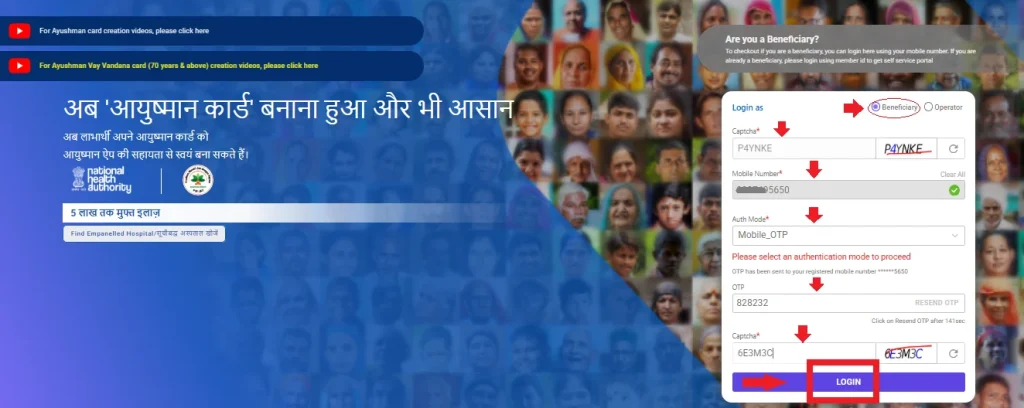
- Enter the Aadhaar-linked mobile number, fill in the OTP received on your mobile, enter the captcha, and click on Login.
- On the next page, select your State, District, and choose PMJAY under the Scheme section.
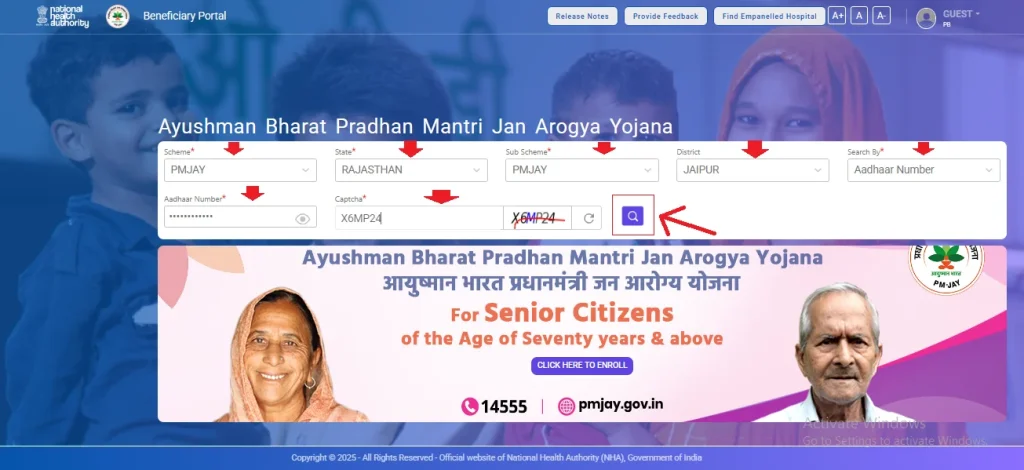
- Search your details using Aadhaar number, Family ID, or PMJAY ID.
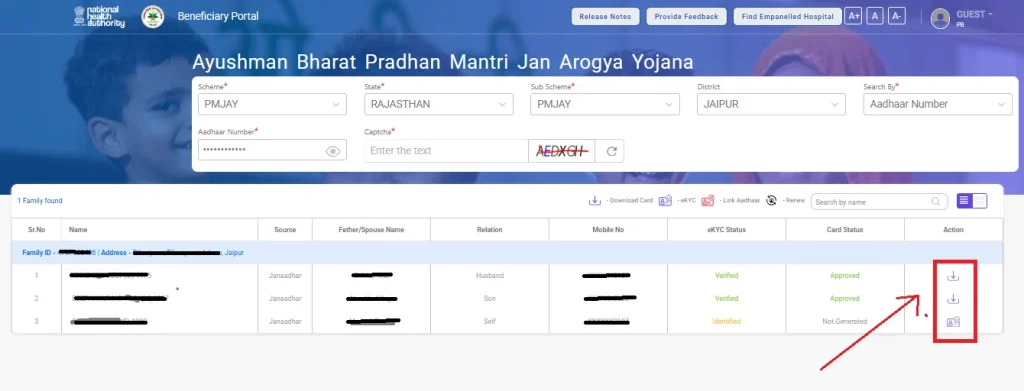
- The family list will appear. Find your name and click on the Download icon given in front of it.
- Complete Aadhaar authentication.
- Select the member whose card you want to download.
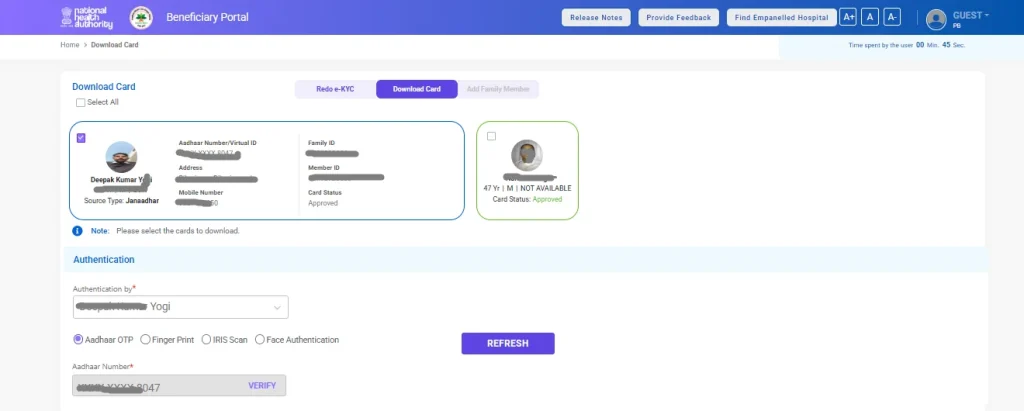
- You will see the Card View; click on the Ayushman Card Download button.
Your Ayushman Card will be downloaded successfully. Using this card, you can avail free medical treatment up to ₹5 lakh.
| NOTE – In addition, you can also access all Ayushman Card–related services, such as registration and download, through the Ayushman App. |
Steps For Ayushman Card Download through DigiLocker
- First, register on the DigiLocker portal (www.digilocker.gov.in) or the DigiLocker app.
- For registration, enter your name, date of birth, and mobile number.
- After registration, log in using your Login ID and password.
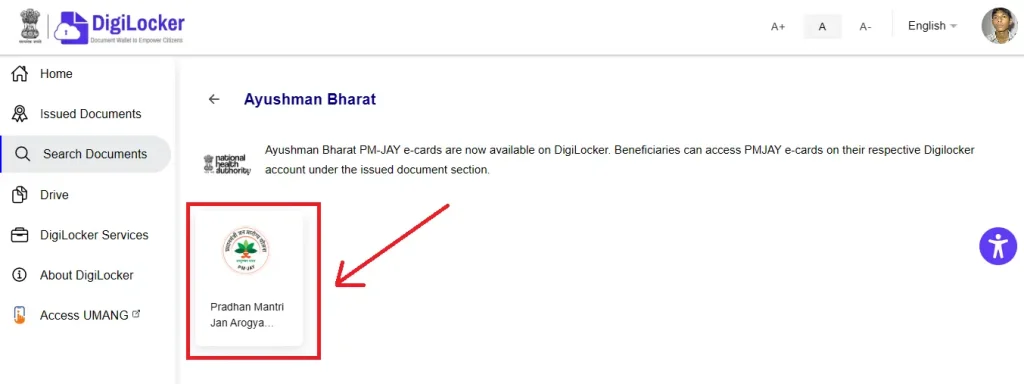
- On the homepage, click on Search Documents.
- Search for Ayushman Bharat and click on Pradhan Mantri Jan Arogya Yojana.
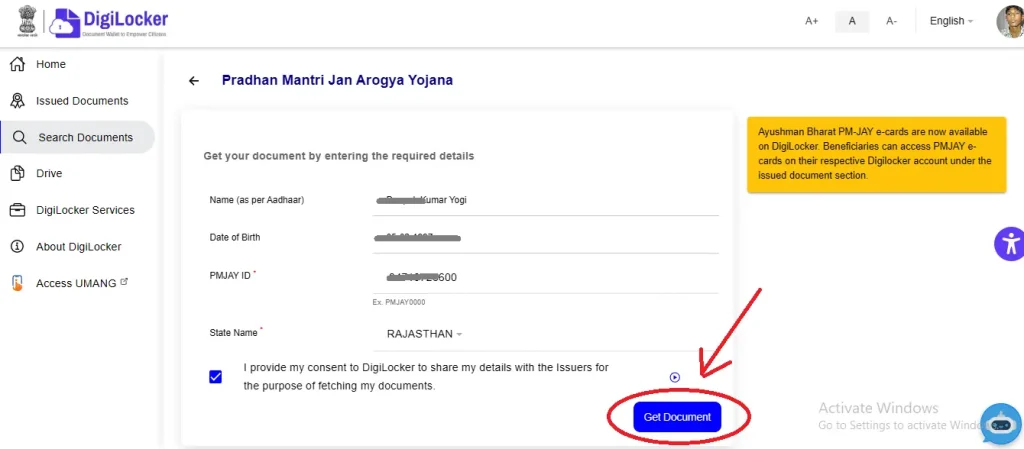
- On the next page, enter your PMJAY ID and State name.
- Click on the Get Document button.
Your Ayushman Card will be available in the Issued Documents section of your DigiLocker profile, from where you can Ayushman Card download it.
Download Ayushman Card from Common Service Center (CSC)
If you are unable to download the Ayushman Card online, you can visit your nearest Common Service Center (CSC) to get the card downloaded and printed. First, your documents will be verified at the CSC. After verification, your Ayushman Card will be issued.
How to Apply for Ayushman Card Portal?
- Visit the official website beneficiary.nha.gov.in.
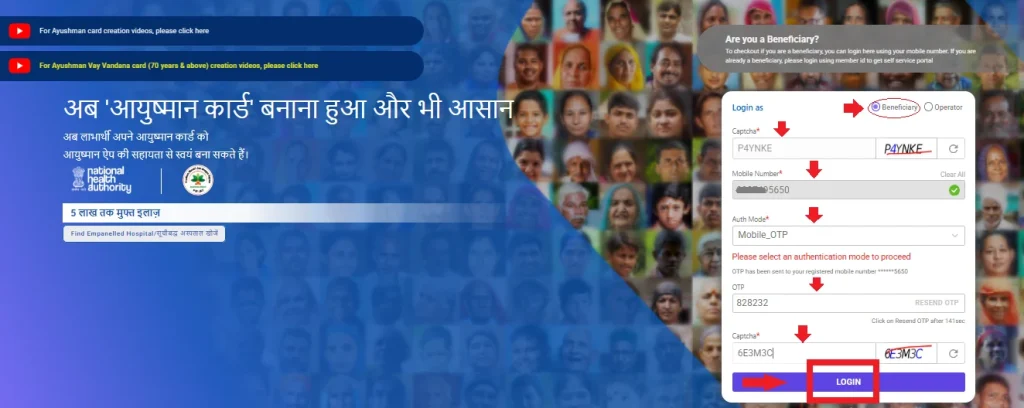
- On the homepage, click on the Beneficiary option.
- Enter your mobile number, select the Auth Mode, fill in the captcha, and log in.
- A new page will open where you need to select Scheme, State, Sub-Scheme, District, and Village.
- In the Search by Aadhaar section, enter your Aadhaar number and click on Search.
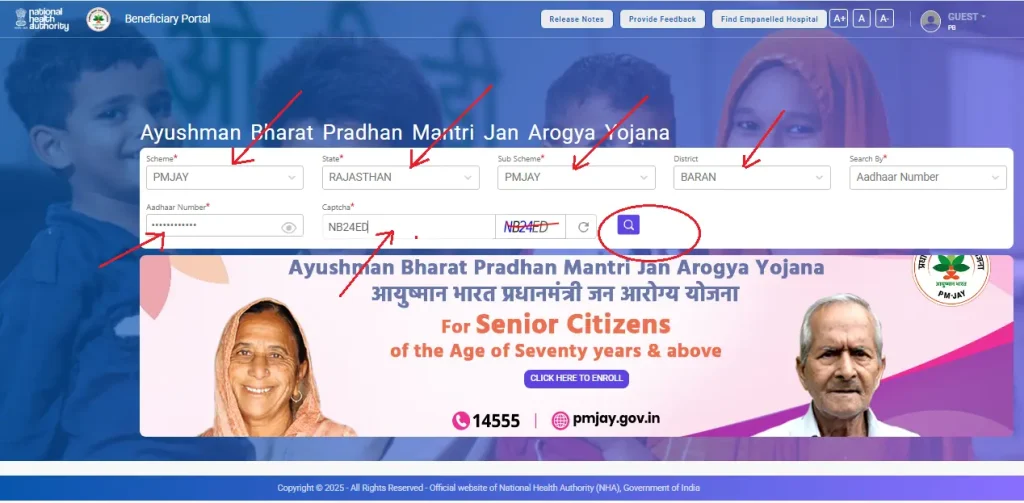
- You will be able to see the Ayushman Card list of your village.
- For those whose card is not generated, Not-Generated will be shown in the Card Status column.
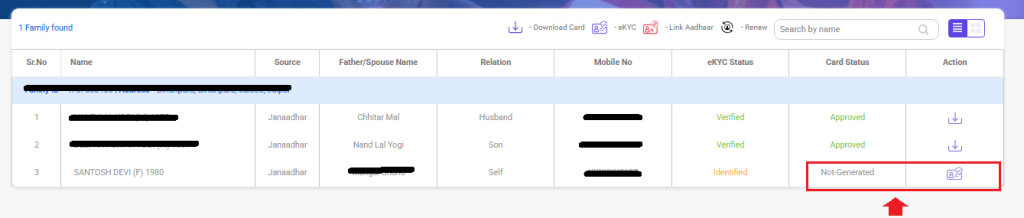
- Click on the Action button for the member whose Ayushman Card you want to create.
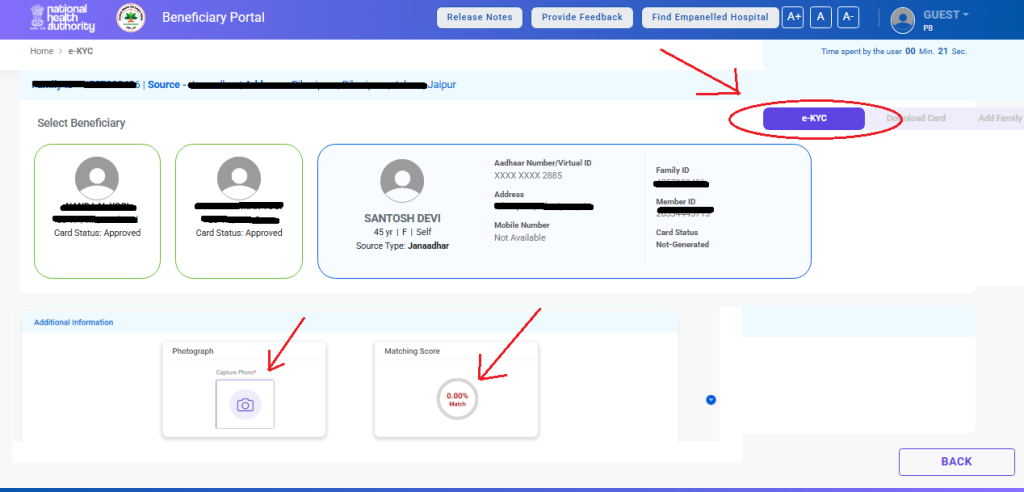
- Complete Aadhaar authentication (eKYC) by entering Aadhaar and mobile number details.
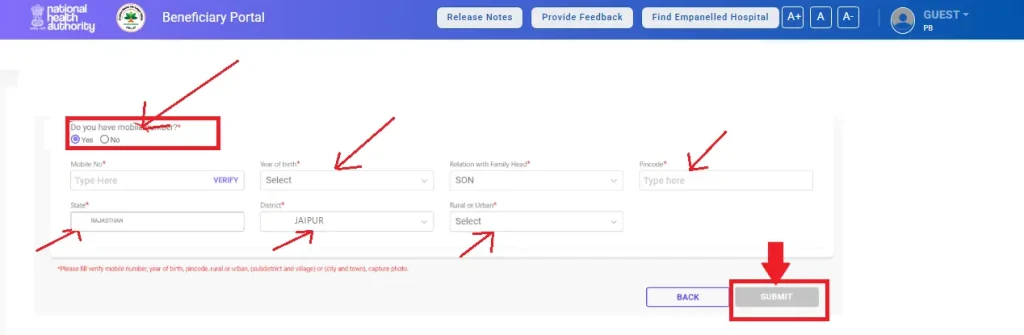
- Fill in all required details such as mobile number, religion, date of birth, PIN code, district, and village, then submit the form.
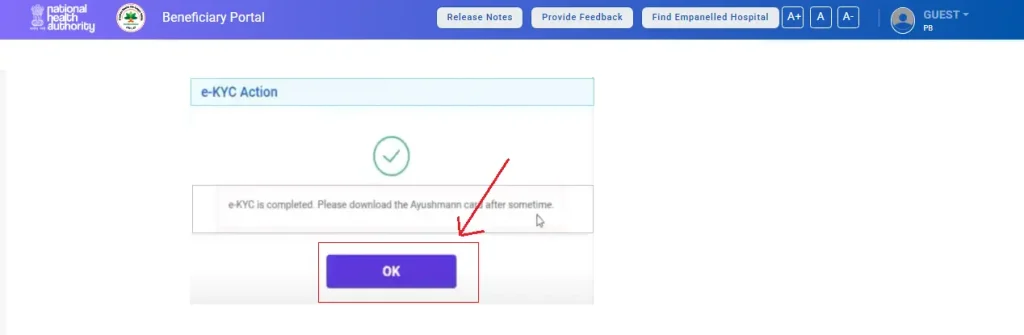
- After a short time, you will receive an e-KYC Completed message.
- Once the status is approved, you can download your Ayushman Card.
Ayushman Card List and Status Check Process
- Visit the PM Jan Arogya Yojana website beneficiary.nha.gov.in.
- Click on the Beneficiary NHA option and log in using your mobile number and OTP.
- After login, you will see the Search Beneficiary option.
- Select any one option: Family ID, Aadhaar Number, or Ration Card Number, and click on Search.
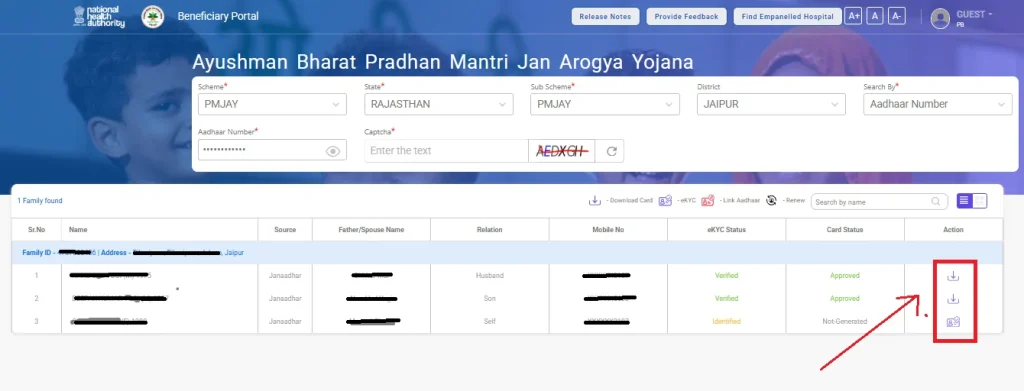
- Your complete family details and member list will appear.
- To check the card status, look at the Card Status section next to your name:
- Not-Generated: Complete your eKYC
- Approved: Your card is ready
Documents Required to Ayushman Card Download Online
To successfully download your Ayushman Card, you will need a few basic documents. An Aadhaar card is required for identity verification, along with a ration card (if applicable) to confirm eligibility. You must also have a mobile number linked to your Aadhaar for OTP verification. If available, a Family ID or PMJAY reference number can help speed up the process. In some cases, proof of residence may be requested during authentication. Having these documents ready ensures a smooth and hassle-free Ayushman Bharat card download process.
Who Is Eligible to Download an Ayushman Card?
Ayushman Card download is available to families identified under the Socio-Economic Caste Census (SECC) 2011. This includes economically weaker households, workers in the unorganised sector, and vulnerable families with limited access to healthcare. If your name appears in the PMJAY beneficiary list, you can apply online and download your Ayushman Card to enjoy cashless and free medical treatment benefits.
What to Do If You Face Issues While Downloading an Ayushman Card?
If you face any issues during the Ayushman Card download process, first check your internet connection and ensure that all details entered are correct. If the problem continues, visit the official Ayushman Bharat website and contact the support team for guidance and assistance.
Ayushman Card Download Support – Contact Details
| Toll-Free Call Center No. | Address | |
|---|---|---|
| 14555 | pmjay@nha.gov.in | 9th Floor, Tower-l, Jeevan Bharati Building, Connaught Place, New Delhi – 110001 |
You can also visit the official website pmjay.gov.in for further support or to download your Ayushman Card directly.
Frequently Asked Questions of Ayushman Card Download Portal
What is Ayushman Card?
Ayushman Card is a health card issued under PMJAY that provides eligible families with free medical treatment up to ₹5 lakh per year.
How to apply for Ayushman Card?
You can apply for an Ayushman Card by visiting the official PMJAY website or your nearest CSC center and verifying details using Aadhaar.
How to make Ayushman Card online?
To make an Ayushman Card online, log in to the PMJAY beneficiary portal, complete eKYC with Aadhaar, and generate the card.
How to get Ayushman Card Download online?
Check eligibility on the PMJAY portal using your mobile number or Aadhaar and complete verification to get your Ayushman Card.
How to download Ayushman Card?
Log in to the PMJAY portal, search your beneficiary details, and download or print the Ayushman Card easily.